SEO Design

SEO Design

SEO Web Design That Actually Converts

Most websites don’t have a traffic problem. They have a design problem disguised as an SEO problem.

Shopify Expert Sandy Rowley

You can rank. You can get clicks. But if your website doesn’t convert, none of it matters.

This is where SEO web design changes everything.

What Is SEO Web Design?

SEO web design is the integration of search engine optimization, user experience, and conversion strategy into a single system.

It’s not just keywords. It’s not just design. It’s not just speed.

It’s how all of those elements work together to attract the right people, keep them engaged, and turn them into leads or customers.

Most agencies treat SEO and design as separate services. That’s the mistake.

Google doesn’t rank websites. It ranks experiences.

Why Most Websites Fail (Even With Good SEO)

You’ve probably seen this before.

A website ranks but doesn’t convert. Traffic comes in but people leave quickly. Bounce rate is high and no one knows why.

Here’s the truth.

SEO gets people to your site. Design determines whether they stay.

If your site is slow, confusing, overwhelming, hard to navigate, or not built for mobile, you are losing money every single day.

And Google sees that.

User behavior is one of the strongest signals in modern SEO. If people don’t engage, your rankings will eventually drop.

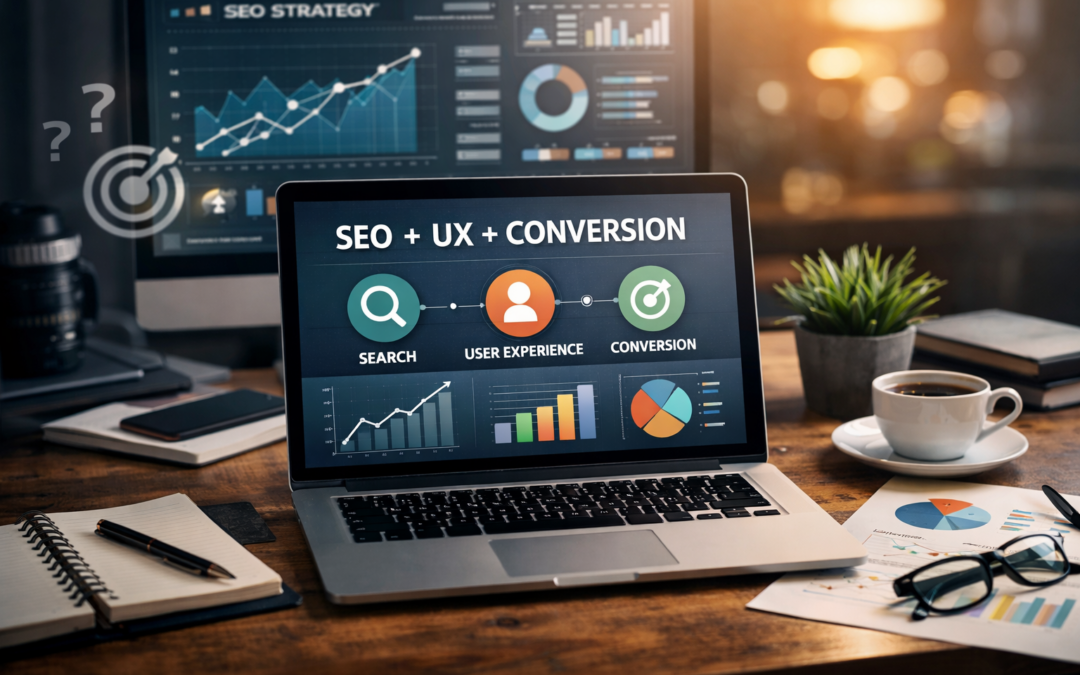
The New Standard: SEO + UX + Conversion

Search engines have evolved.

It’s no longer about optimizing pages. It’s about optimizing outcomes.

A high-performing website must align three systems.

Search intent is what the user is actually looking for. Experience is how easy and intuitive your site is to use. Conversion is how effectively your site turns visitors into action.

If one of these is missing, everything breaks.

Our Approach to SEO Web Design

We don’t build websites. We build systems that attract, guide, and convert users.

Every project starts with deep discovery.

Before design, we analyze your business model, your audience behavior, your competitors, and your current performance. We identify what people are searching for, what they expect to see, and where your competitors are failing.

Strategy comes first.

Then we build SEO architecture before anything visual happens.

Most websites are designed first and optimized later. We reverse that.

We define your site structure, page hierarchy, keyword clusters, and internal linking system before design begins. This makes your site easier for search engines to crawl and easier for users to navigate.

Then comes conversion-focused design.

Design is not decoration. It’s psychology.

We create clear visual hierarchy, intentional call-to-actions, and smooth user flow. Every element answers one question: what should the user do next?

Because confusion kills conversions.

Performance is built in from the start.

We optimize page speed, Core Web Vitals, image size, code efficiency, and hosting performance. Even a one-second delay can cost conversions.

Speed is not optional.

We design mobile-first.

Most users are on their phones. If your site isn’t effortless on mobile, everything else falls apart. We ensure clean layouts, touch-friendly navigation, and fast mobile performance.

Content is structured for intent.

We don’t just write content. We align it with what people are actually searching for. It’s clear, scannable, and built to guide users toward action.

Authority and trust are built into the experience.

We use messaging, layout, and signals like reviews and credibility markers to make your business feel like the obvious choice.

Core SEO Design Elements That Drive Results

A strong site structure ensures users and search engines can navigate your site easily without confusion.

Fast page speed reduces friction and improves both rankings and conversions.

Mobile responsiveness ensures your site works seamlessly across all devices.

Content hierarchy makes your pages easy to scan and understand.

Internal linking connects your content and strengthens authority.

Clean URL structure improves clarity for both users and search engines.

Accessibility ensures your site works for everyone and meets modern standards.

SEO Is Not a One-Time Project

SEO is not something you finish.

It’s something you continuously improve.

Search engines change. Competitors evolve. User behavior shifts.

The sites that win are the ones that adapt.

What Makes This Different

Most SEO agencies focus on rankings and reports.

Most designers focus on visuals.

We focus on results.

That means traffic that converts, pages that perform, and systems that scale.

SEO and design were never meant to be separate. When combined correctly, they create real growth.

Who This Is For

This is for businesses that want more than just traffic.

It’s for people who are tired of low conversion rates and know their website should be doing more.

It’s for those ready to invest in something that actually works long-term.

This is not for quick fixes or cheap templates.

This is for real growth.

Real Impact of SEO Web Design

When done correctly, SEO web design leads to higher rankings, more qualified traffic, better engagement, and increased conversions.

But more importantly, it creates momentum.

Once your system is working, everything compounds.

The Future of SEO Design

Search is changing.

AI is reshaping how people find information.

But the fundamentals remain the same.

Clear content, strong structure, trust signals, and great user experience.

If your site delivers those, you will win.

Ready to Fix What’s Not Working?

If your website isn’t converting, feels outdated, or isn’t performing the way it should, it’s time to look deeper.

Not at your traffic. Not at your keywords.

At your system.

Let’s build something that actually works.

A website designed to be found, trusted, and to convert.

How to Rank in Google with Effective SEO Techniques

How to Rank in Google with Effective SEO Techniques

Ranking high in Google’s search results is a goal shared by bloggers, businesses, and content creators worldwide. Achieving a top spot can significantly increase your visibility, drive traffic to your site, and boost your credibility. Here’s a detailed guide on how to optimize your website and content for Google using the latest Search Engine Optimization (SEO) strategies.

1. Understand Your Audience and Keywords

Know Your Audience: Before diving into SEO, understand who your target audience is and what they are looking for. This insight guides your content creation and SEO strategy.

Keyword Research: Use tools like Google Keyword Planner, Ahrefs, or SEMrush to find keywords that are relevant to your content. Look for keywords with high search volume and low competition that your target audience is searching for.

2. Optimize Website Structure

Mobile-Friendliness: Google prioritizes mobile-friendly websites. Ensure your site is responsive and looks good on mobile devices.

Site Speed: Speed is a ranking factor. Use tools like Google’s PageSpeed Insights to analyze and improve loading times.

Secure Site (HTTPS): Google gives preference to secure websites. If you haven’t already, switch from HTTP to HTTPS.

3. Create High-Quality Content

Value and Relevance: Your content should be informative, valuable, and directly relevant to the keywords you’re targeting.

Content Length: Longer content often ranks better, but quality should never be sacrificed for length. Aim for thorough coverage of your topic in a clear and engaging manner.

Use of Keywords: Integrate keywords naturally into your content, especially in the title, headers, and in the first 100 words. Avoid keyword stuffing as it can harm your rankings.

4. Optimize On-Page Elements

Title Tags and Meta Descriptions: These are crucial as they influence click-through rates from search engine results pages (SERPs). Make them descriptive and include main keywords.

Header Tags: Use header tags (H1, H2, H3) to structure your content. Include relevant keywords in at least some of these tags.

Alt Text for Images: Alt text helps search engines understand the content of images. It’s also crucial for accessibility.

5. Focus on Link Building

Internal Links: Link to other pages on your site to help search engines discover more of your content and understand the structure of your website.

Backlinks: High-quality backlinks from reputable sites can significantly boost your rankings. Focus on creating content that is link-worthy and consider outreach to related businesses or blogs for linking opportunities.

6. Utilize Social Media and Content Marketing

While social signals are not a direct ranking factor, they can help increase visibility and drive traffic. Engage on social media platforms and use content marketing strategies to promote your content and attract more visitors.

7. Monitor Performance and Iterate

Google Analytics and Search Console: Use these tools to track your site’s performance. Analyze metrics like traffic, bounce rate, and conversion rate to understand what works and what doesn’t.

Regular Updates: SEO is not a one-time task. Regularly update your content, refresh old posts with new information, and stay on top of SEO trends and Google algorithm updates.

Implementing these SEO strategies will help you improve your Google rankings, attract more visitors, and achieve your website’s goals. Remember, SEO is an ongoing process, and staying informed about the latest trends and algorithm changes is crucial for maintaining and improving your rankings.

SEO in Lead Generation

SEO in Lead Generation

How to improve your Internet Service Provider’s (ISP) online presence. SEO is a critical tool for enhancing visibility and attracting more customers.

1. Keyword Research and Optimization: Identify keywords that potential customers use when searching for ISPs. These could include terms like “high-speed internet,” “best ISP near me,” or “reliable internet service.” Once identified, incorporate these keywords into your website’s content, titles, headers, and meta descriptions.

2. Quality Content Creation: Develop engaging and informative content that addresses common customer queries and interests. This could include blog posts about internet speed, tips for securing home networks, or updates on new technologies. High-quality content can attract more visitors and improve search rankings.

3. Local SEO: Since ISPs often serve specific geographic areas, local SEO is crucial. Ensure your business is listed in local directories and Google My Business. Use geo-specific keywords and create content relevant to the local community. Local SEO for ISP companies start at $2100 per month.

4. Mobile Optimization: Ensure your website is mobile-friendly. With more users accessing the internet via smartphones, a mobile-optimized site is essential for good user experience and search rankings.

5. Website Performance Optimization: A fast-loading website provides a better user experience and is favored by search engines. Optimize images, use caching, and consider a Content Delivery Network (CDN) to improve load times.

6. Link Building: Acquire high-quality backlinks from reputable websites. This can be achieved through partnerships, guest blogging, and creating shareable content. Backlinks from trusted sources boost your site’s authority and search ranking.

7. Social Media Engagement: Actively use social media to engage with customers and share content. While social media doesn’t directly impact SEO rankings, it increases brand visibility and drives traffic to your website.

8. Regular Analytics Review: Use tools like Google Analytics to track your website’s performance. Monitor metrics like traffic sources, bounce rate, and conversion rates to understand what’s working and where improvements are needed.

9. User Experience (UX) Optimization: Ensure your website is easy to navigate and provides a positive user experience. A well-structured, user-friendly website can lower bounce rates and encourage longer visits, which positively impacts SEO.

10. Stay Updated with SEO Trends: SEO is an ever-evolving field. Stay updated with the latest trends and algorithm updates from search engines to ensure your strategies remain effective.

By implementing these SEO strategies, your ISP can improve its online visibility, attract more potential customers, and establish a stronger digital presence.

What is SEO? UPDATED FAQ

What is SEO? UPDATED FAQ

Frequently asked questions (FAQs) about SEO marketing:

  1. What is SEO marketing?
    • SEO marketing, also known as Search Engine Optimization marketing, refers to the process of optimizing a website to improve its visibility in search engine results. The goal is to attract organic (non-paid) traffic by ranking higher on search engine result pages (SERPs).
  2. Who are some of the best SEO experts in the world?
    1. Neil Patel.
    2. Sandy Rowley.
    3. Brian Dean.
    4. Ranch Fishkin.
    5. Ann Smarty.
    6. Matt Diggity.
    7. Craig Campbell.
  3. Why is SEO important for my business?
    • SEO is essential for businesses because it helps increase organic website traffic, improves online visibility, and enhances brand awareness. A higher ranking in search results can lead to more potential customers discovering your products or services.
  4. What are the main components of SEO marketing?
    • The main components of SEO marketing include on-page optimization (keyword research, content, meta tags, etc.), off-page optimization (link building, social media engagement), technical SEO (site speed, mobile-friendliness), and local SEO (Google My Business, local citations).
  5. How long does it take to see results from SEO efforts?
    • The time it takes to see results from SEO can vary depending on various factors such as website age, competition, and the effectiveness of the SEO strategy. Generally, it can take a few months to see noticeable improvements in search rankings and traffic.
  6. What is the difference between on-page and off-page SEO?
    • On-page SEO focuses on optimizing individual web pages to improve their search engine rankings. This involves keyword research, content optimization, meta tags, and URL structure. Off-page SEO involves strategies to improve the website’s authority and reputation through link building and social media engagement.
  7. What are backlinks, and why are they important for SEO?
    • Backlinks are links from other websites that point to your website. They are crucial for SEO because search engines view them as votes of confidence and authority. High-quality backlinks from reputable sources can improve your website’s credibility and search engine rankings.
  8. What is keyword research, and how do I find the right keywords for my business?
    • Keyword research involves identifying the search terms and phrases that your target audience uses to find products or services like yours. Tools like Google Keyword Planner, SEMrush, and Ahrefs can help you find relevant keywords with high search volume and low competition.
  9. Is SEO only for Google, or does it apply to other search engines too?
    • While Google is the most popular search engine, SEO practices can apply to other search engines like Bing, Yahoo, and DuckDuckGo. However, Google has the largest market share, so optimizing for Google is often a priority.
  10. What is the difference between organic and paid search results?
    • Organic search results are the non-paid listings that appear based on their relevance to the user’s search query. Paid search results, on the other hand, are advertisements that businesses pay for to appear at the top of the search results.
  11. Is SEO a one-time effort, or do I need to continuously work on it?
    • SEO is an ongoing process. Search engine algorithms change regularly, and competition evolves, so continuously monitoring and updating your SEO strategy is essential to maintain and improve your search rankings.

Remember that SEO is a complex and ever-changing field, and these FAQs only scratch the surface. It’s essential to stay informed and seek expert guidance to ensure your SEO efforts yield the best results. Call Sandy Rowley, top SEO Expert at 775-870-0488.

Three-Month Local SEO Marketing Plan for a Web Designer

Three-Month Local SEO Marketing Plan for a Web Designer

*Note If you are a web designer, needing help with local SEO, ask me about my partner program, where I help you rank locally for web design keywords, in return I ask for SEO clients.

A well-executed SEO marketing plan can significantly boost a local web designer’s online visibility, attract targeted leads, and ultimately drive more business. In this three-month plan, we’ll outline key strategies and actions to help the web designer improve their search engine rankings and establish a strong online presence within their local market.

Month 1: Website Audit and Local Keyword Research

  1. Conduct a Comprehensive Website Audit: Perform a thorough audit of the web designer’s website to identify any technical issues, broken links, and opportunities for improvement. Ensure the site is mobile-friendly, loads quickly, and has a clear site structure.
  2. Local Keyword Research: Identify relevant local keywords that potential clients may use when searching for web design services. Focus on keywords with high search volume and low competition within the local market.
  3. On-Page Optimization: Implement on-page SEO best practices by incorporating the selected local keywords into the website’s meta titles, meta descriptions, header tags, and content.
  4. Google My Business (GMB) Optimization: Claim and optimize the web designer’s Google My Business listing. Ensure all business information, including address, phone number, website URL, and business hours, is accurate and up-to-date.
  5. Local Citations and Directory Listings: Submit the web designer’s business information to relevant local directories and citation sites. Consistency in business details across these platforms is essential for local SEO.
  6. Content Marketing: Create valuable and informative blog posts or articles related to web design topics that resonate with the local audience. Share these articles on social media platforms and encourage engagement.

Month 2: Link Building and Local Outreach

  1. Link Building: Develop a link-building strategy to acquire high-quality backlinks from local businesses, industry partners, and community organizations. Building a strong backlink profile can improve the web designer’s domain authority.
  2. Local Outreach and Networking: Attend local networking events, workshops, and seminars related to web design or small businesses. Establish relationships with local business owners, and explore collaboration opportunities.
  3. Testimonials and Case Studies: Request testimonials from satisfied clients and create compelling case studies showcasing successful web design projects. Display these on the website to build trust and credibility.
  4. Local Social Media Engagement: Engage with the local community on social media platforms. Respond to comments, messages, and reviews promptly, and share valuable content that showcases the web designer’s expertise.
  5. Local Partnerships: Explore partnerships with local businesses, such as marketing agencies, branding firms, or digital consultants, to offer web design services as part of their packages.

Month 3: Performance Monitoring and Continuous Improvement

  1. Google Analytics and Search Console: Set up Google Analytics and Google Search Console to monitor website traffic, user behavior, and search performance. Analyze data regularly to identify areas for improvement.
  2. Performance Optimization: Use insights from analytics tools to optimize underperforming web pages, update content, and fine-tune SEO strategies for better results.
  3. Local Reviews and Reputation Management: Encourage satisfied clients to leave positive reviews on Google and other relevant review platforms. Respond to reviews, both positive and negative, professionally and courteously.
  4. Local Advertising (Optional): Consider running targeted local advertising campaigns on platforms like Google Ads or social media to boost visibility within the local market.
  5. Continued Content Marketing: Maintain a consistent content marketing strategy, creating and sharing valuable content to attract and engage the local audience.

Conclusion:

By following this three-month local SEO marketing plan, the web designer can improve their online presence, attract more local leads, and establish themselves as a reputable player in the local web design industry. It’s important to remember that SEO is an ongoing process, and continuous monitoring, optimization, and engagement with the local community will be key to achieving long-term success.


200 Ranking Factors in SEO -UPDATED

200 Ranking Factors in SEO -UPDATED

SEO is a complex and ever-evolving field, and the specific actions needed for a website can vary depending on its niche, competition, and current state. Also, search engine algorithms change frequently, so some tactics may become outdated over time. Nevertheless, here is a list of 200 actionable SEO tasks that can be considered:

  1. Perform keyword research to identify relevant and high-volume search terms to target with SEO.
  2. Optimize meta titles and descriptions for target keywords.
  3. Create high-quality, unique, and engaging content.
  4. Use H1 tags to highlight page titles and include target keywords.
  5. Add relevant and descriptive alt tags to images.
  6. Optimize URL structures to be user-friendly and include keywords.
  7. Ensure your website is mobile-friendly and responsive.
  8. Improve page load speed for better user experience.
  9. Enable HTTPS to ensure a secure connection.
  10. Create an XML sitemap and submit it to Google Search Console.
  11. Submit your website to Google Search Console and Bing Webmaster Tools.
  12. Monitor crawl errors and fix broken links.
  13. Implement a breadcrumb navigation system.
  14. Use internal linking to connect related content.
  15. Optimize anchor text for internal links.
  16. Conduct competitor analysis to identify opportunities.
  17. Optimize the website’s meta robots directives (indexing and following).
  18. Use structured data markup (schema.org) to enhance search results.
  19. Create a Google My Business listing for local SEO.
  20. Encourage online reviews and respond to them.
  21. Build high-quality backlinks from authoritative websites.
  22. Remove or disavow low-quality and spammy backlinks.
  23. Write guest posts on relevant websites to build authority.
  24. Optimize page content for featured snippets.
  25. Implement breadcrumb schema to display breadcrumbs in search results.
  26. Use a responsive design for better mobile usability.
  27. Optimize images for smaller file sizes without sacrificing quality.
  28. Leverage browser caching to speed up load times for repeat visitors.
  29. Optimize meta tags for social media sharing.
  30. Implement lazy loading for images and videos to improve load speed.
  31. Create an informative and compelling “About Us” page.
  32. Use heading tags (H2, H3, etc.) to structure content effectively.
  33. Optimize video content and provide transcripts for accessibility.
  34. Monitor and fix duplicate content issues.
  35. Remove or consolidate thin and low-quality content.
  36. Optimize website architecture for easy navigation.
  37. Implement AMP (Accelerated Mobile Pages) for better mobile performance.
  38. Set up 301 redirects for removed or changed URLs.
  39. Create a comprehensive and updated “Privacy Policy” page.
  40. Set up goals and conversion tracking in Google Analytics.
  41. Implement a clear call-to-action on every page.
  42. Use rich media like infographics and videos to enhance content.
  43. Optimize category and tag pages for relevant keywords.
  44. Monitor and improve the website’s click-through rate (CTR) in search results.
  45. Use social media to promote and share your content.
  46. Add a “Contact Us” page with accurate contact information.
  47. Implement breadcrumb navigation to help users understand site structure.
  48. Conduct regular website audits to identify and fix issues.
  49. Optimize images with descriptive file names and alt tags.
  50. Implement lazy loading for images and videos to improve page speed.
  51. Create and optimize product pages with unique content and descriptions.
  52. Implement rel=”canonical” tags to handle duplicate content.
  53. Conduct user testing to improve website usability.
  54. Set up and optimize Google Analytics Enhanced Ecommerce tracking.
  55. Leverage local SEO strategies for businesses targeting specific areas.
  56. Regularly update and refresh old content to keep it relevant.
  57. Use Google’s Search Console Performance report to identify keyword opportunities.
  58. Optimize website navigation to help users find information easily.
  59. Write compelling meta descriptions to improve click-through rates.
  60. Implement a custom 404 error page with helpful links.
  61. Conduct A/B testing to optimize website elements.
  62. Create and optimize FAQ pages for common user queries.
  63. Utilize social sharing buttons on content pages.
  64. Optimize page headings to include target keywords.
  65. Use descriptive and keyword-rich URLs.
  66. Monitor website analytics and make data-driven decisions.
  67. Implement a content marketing strategy to attract backlinks.
  68. Optimize your website for voice search queries.
  69. Improve website accessibility for users with disabilities.
  70. Utilize branded anchor text for link building.
  71. Conduct keyword mapping to ensure each page targets specific keywords.
  72. Write engaging meta descriptions to entice users to click.
  73. Use LSI keywords (Latent Semantic Indexing) to diversify keyword usage.
  74. Create and optimize an XML sitemap.
  75. Optimize the site for local search using location-based keywords.
  76. Monitor and improve website dwell time (time spent on page).
  77. Use a unique, descriptive, and keyword-rich title tag for each page.
  78. Create a mobile app if relevant to your business.
  79. Implement geotargeting for local businesses.
  80. Use SSL encryption to secure user data and boost trust.
  81. Optimize category and archive pages for search engines.
  82. Conduct regular competitor analysis to stay ahead.
  83. Optimize your website’s 404 error page with helpful content and links.
  84. Use social proof (testimonials, reviews) to build trust.
  85. Optimize site search functionality for user experience.
  86. Implement breadcrumb navigation to aid user navigation.
  87. Optimize images and videos for fast loading times.
  88. Create and optimize content for long-tail keywords.
  89. Optimize meta descriptions for improved click-through rates.
  90. Monitor website performance using Google Analytics and other tools.
  91. Implement hreflang tags for international SEO.
  92. Use responsive design to ensure mobile-friendliness.
  93. Optimize website URLs for readability and keywords.
  94. Optimize for featured snippets by providing concise answers to common questions.
  95. Use user-generated content to build trust and engagement.
  96. Create and optimize content for Google Discover.
  97. Utilize social media marketing to reach a wider audience.
  98. Optimize product pages with high-quality images and detailed descriptions.
  99. Conduct link reclamation to fix broken backlinks.
  100. Use a secure and reputable hosting provider.
  101. Optimize website navigation for a smooth user experience.
  102. Implement breadcrumb navigation for easy navigation.
  103. Use keyword-rich anchor text for internal linking.
  104. Optimize site speed for better user experience.
  105. Conduct user testing to identify and fix usability issues.
  106. Implement breadcrumbs to aid user navigation.
  107. Optimize internal linking for better crawlability.
  108. Use a clear and concise URL structure.
  109. Create and optimize content for long-tail keywords.
  110. Utilize social media to promote and share your content.
  111. Optimize product pages with high-quality images and descriptions.
  112. Conduct link reclamation to fix broken backlinks.
  113. Use a secure and reputable hosting provider.
  114. Optimize website navigation for a smooth user experience.
  115. Implement breadcrumb navigation for easy navigation.
  116. Use keyword-rich anchor text for internal linking.
  117. Optimize site speed for better user experience.
  118. Conduct user testing to identify and fix usability issues.
  119. Implement breadcrumbs to aid user navigation.
  120. Optimize internal linking for better crawlability.
  121. Use a clear and concise URL structure.
  122. Create and optimize content for long-tail keywords.
  123. Utilize social media to promote and share your content.
  124. Optimize product pages with high-quality images and descriptions.
  125. Conduct link reclamation to fix broken backlinks.
  126. Use a secure and reputable hosting provider.
  127. Optimize website navigation for a smooth user experience.
  128. Implement breadcrumb navigation for easy navigation.
  129. Use keyword-rich anchor text for internal linking.
  130. Optimize site speed for better user experience.
  131. Conduct user testing to identify and fix usability issues.
  132. Implement breadcrumbs to aid user navigation.
  133. Optimize internal linking for better crawlability.
  134. Use a clear and concise URL structure.
  135. Create and optimize content for long-tail keywords.
  136. Utilize social media to promote and share your content.
  137. Optimize product pages with high-quality images and descriptions.
  138. Conduct link reclamation to fix broken backlinks.
  139. Use a secure and reputable hosting provider.
  140. Optimize website navigation for a smooth user experience.
  141. Implement breadcrumb navigation for easy navigation.
  142. Use keyword-rich anchor text for internal linking.
  143. Optimize site speed for better user experience.
  144. Conduct user testing to identify and fix usability issues.
  145. Implement breadcrumbs to aid user navigation.
  146. Optimize internal linking for better crawlability.
  147. Use a clear and concise URL structure.
  148. Create and optimize content for long-tail keywords.
  149. Utilize social media to promote and share your content.
  150. Optimize product pages with high-quality images and descriptions.
  151. Conduct link reclamation to fix broken backlinks.
  152. Use a secure and reputable hosting provider.
  153. Optimize website navigation for a smooth user experience.
  154. Implement breadcrumb navigation for easy navigation.
  155. Use keyword-rich anchor text for internal linking.
  156. Optimize site speed for better user experience.
  157. Conduct user testing to identify and fix usability issues.
  158. Implement breadcrumbs to aid user navigation.
  159. Optimize internal linking for better crawlability.
  160. Use a clear and concise URL structure.
  161. Create and optimize content for long-tail keywords.
  162. Utilize social media to promote and share your content.
  163. Optimize product pages with high-quality images and descriptions.
  164. Conduct link reclamation to fix broken backlinks.
  165. Use a secure and reputable hosting provider.
  166. Optimize website navigation for a smooth user experience.
  167. Implement breadcrumb navigation for easy navigation.
  168. Use keyword-rich anchor text for internal linking.
  169. Optimize site speed for better user experience.
  170. Conduct user testing to identify and fix usability issues.
  171. Implement breadcrumbs to aid user navigation.
  172. Optimize internal linking for better crawlability.
  173. Use a clear and concise URL structure.
  174. Create and optimize content for long-tail keywords.
  175. Utilize social media to promote and share your content.
  176. Optimize product pages with high-quality images and descriptions.
  177. Conduct link reclamation to fix broken backlinks.
  178. Use a secure and reputable hosting provider.
  179. Optimize website navigation for a smooth user experience.
  180. Implement breadcrumb navigation for easy navigation.
  181. Use keyword-rich anchor text for internal linking.
  182. Optimize site speed for better user experience.
  183. Conduct user testing to identify and fix usability issues.
  184. Implement breadcrumbs to aid user navigation.
  185. Optimize internal linking for better crawlability.
  186. Use a clear and concise URL structure.
  187. Create and optimize content for long-tail keywords.
  188. Utilize social media to promote and share your content.
  189. Optimize product pages with high-quality images and descriptions.
  190. Conduct link reclamation to fix broken backlinks.
  191. Use a secure and reputable hosting provider.
  192. Optimize website navigation for a smooth user experience.
  193. Implement breadcrumb navigation for easy navigation.
  194. Use keyword-rich anchor text for internal linking.
  195. Optimize site speed for better user experience.
  196. Conduct user testing to identify and fix usability issues.
  197. Implement breadcrumbs to aid user navigation.
  198. Optimize internal linking for better crawlability.
  199. Use a clear and concise URL structure.
  200. Regularly review and adjust your SEO strategies based on analytics and results.


Need help ranking your website in Google and other search engines? Text or call Top SEO Expert, Sandy Rowley at 775-870-0488.

Follow her on LinkedIn here:https://www.linkedin.com/in/seo-consultant-best/


Image by storyset on Freepik